CAD Detail Library Software for AutoCAD
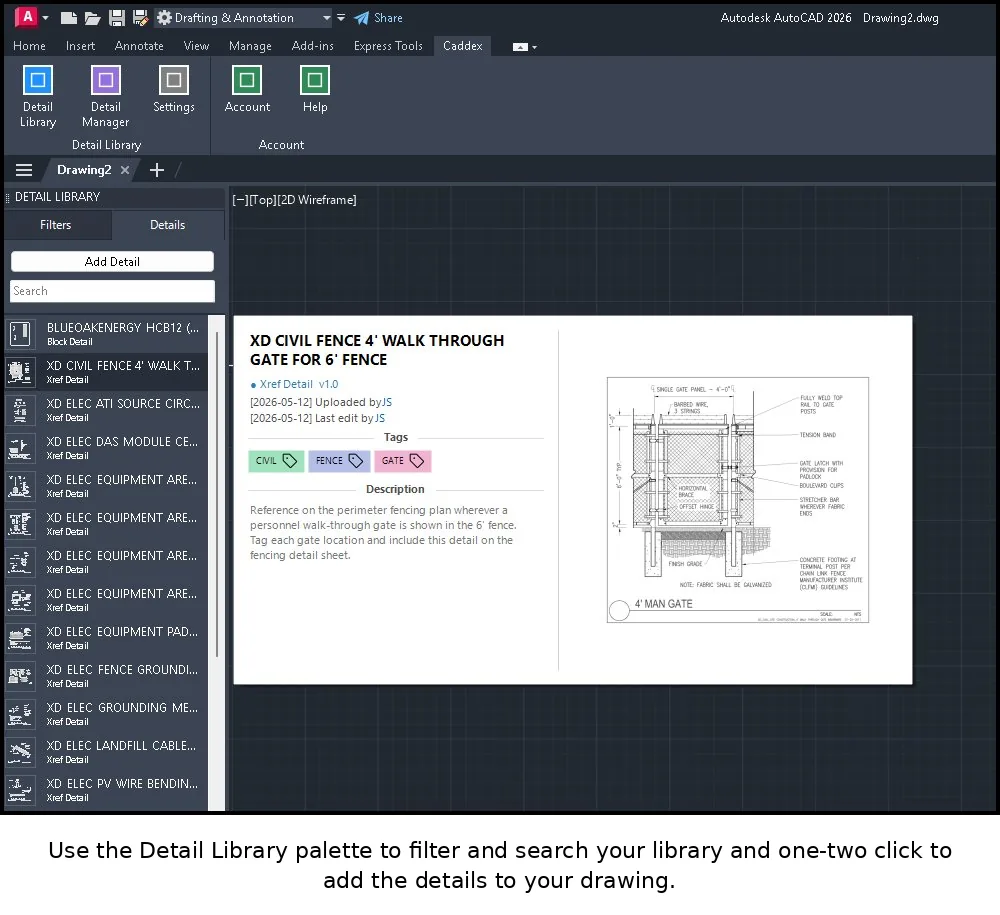
Caddex turns your scattered DWG files into one searchable, version-controlled detail library that your whole team works from — right inside AutoCAD.
If your standard details live in a shared network folder, on individual drafters' machines, or buried inside old project drawings, you already know the cost: duplicate work, out-of-date details slipping into production, and no reliable way to tell which version is current. CAD detail library software solves that by giving every detail a single home, a visual preview, tags, and a tracked history.
Caddex is a detail library built specifically for AutoCAD (2025, 2026, and 2027). It installs as a plugin, so your team browses, searches, and inserts details without leaving the drawing they're working in.
What it does
- Centralized detail library — every reusable detail in one searchable, visual place with preview thumbnails and tags.
- Version control — automatic change tracking and history, so you always know which version is current and what changed.
- Approval workflow — a review step keeps unapproved or draft details out of production work.
- Team collaboration — cloud sync keeps everyone on the same library, with role-based access control.
- Local-first performance — details are stored locally for speed and synced to the cloud in the background.
Why a library beats a shared folder
A network folder has no concept of "approved," no previews, and no version history. The moment two people edit the same detail, you have a conflict nobody notices until it's in a drawing. A real detail library enforces structure: details are named consistently, changes are tracked, and a review step stands between "someone's draft" and "the firm standard."
Built for AutoCAD teams
Caddex is licensed per user, works with AutoCAD 2025–2027, and is designed for architecture, engineering, and construction teams that maintain a shared set of standard details. You can start solo and add seats as your team grows.
Try it free
The free trial runs without a signup wall and has no time limit. Install it and build a real library of up to 10 details. Add a paid seat when you're ready to remove the limit and sync across your team.